 Buckets
Tasks
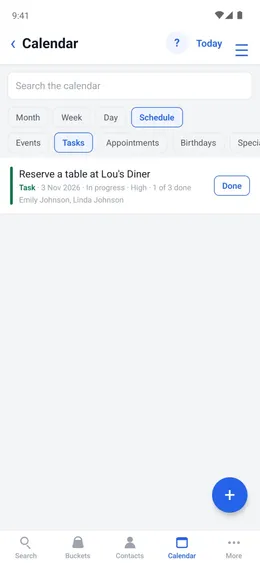
Tasks sit on the calendar with your events, with a status, a priority, a checklist and the people doing them.
A task
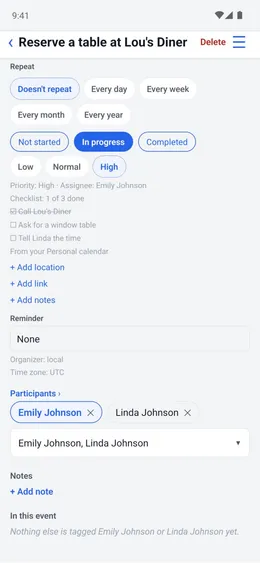
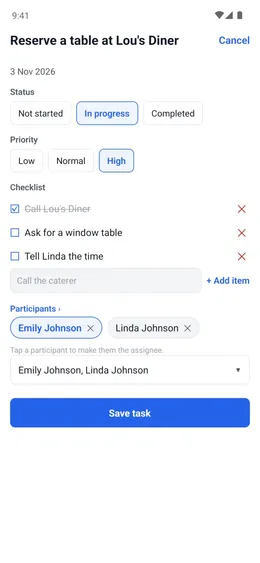
Each task has a start and a due date, a status (Not started, In progress, Completed) and a priority (Low, Normal, High).
Menu ☰ → Calendar → + → Task
- Enter the title and the dates.
- Open the task and tap its status and priority.
Checklist
The task's row shows how much is done, such as “1 of 3 done”.
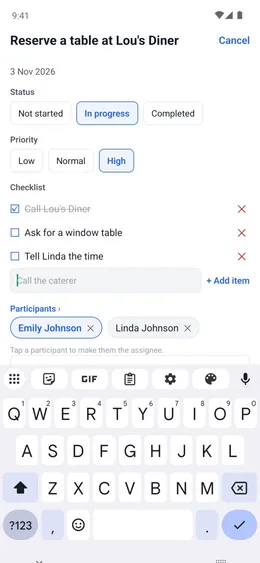
The task → Edit task → Checklist
- Tap + Add item for each step.
- Tick each one when it is done.
People
Add the people doing the task, and choose one as the assignee. Remind by email sends them the due date.
The task → Participants
- Choose the contacts.
- Tap one to make them the assignee.
Done
Tap Done on the task's row when it is finished. Mine shows only your tasks. Not done shows the ones still open.
Menu ☰ → Calendar → Tasks
- Tap Done on the task.
- Tap Mine or Not done to show only those.